

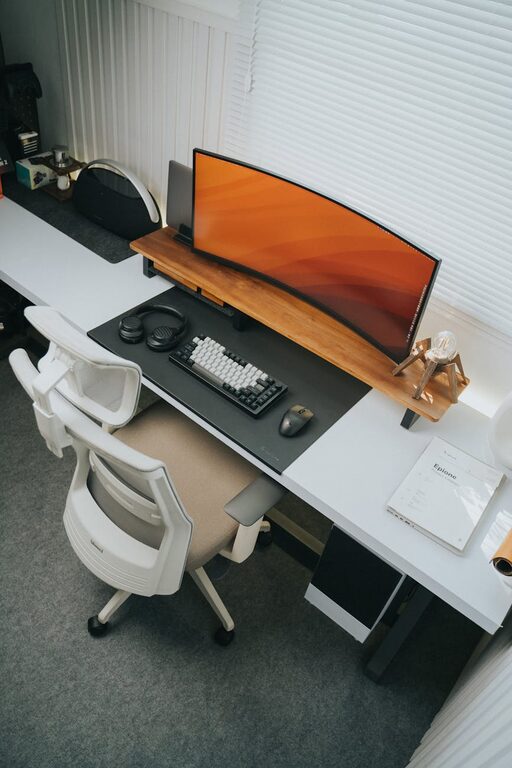
Working from home has become a common experience for many, and having a well-organized workspace is key to maintaining productivity and comfort throughout your day. Whether you have a dedicated room or a small corner in your living space, creating an efficient and tidy work environment can make a big difference in how you focus and perform.
In this post, we’ll explore practical tips to help you design a home workspace that supports your daily tasks and inspires you to do your best work.
Why an Organized Workspace Matters
An organized workspace is more than just neatness. It affects your mindset, reduces distractions, and helps you stay on track. A cluttered desk can lead to stress and waste time as you search for documents or supplies. Conversely, a well-planned area promotes concentration and allows you to switch easily between tasks.
1. Choose the Right Location
Start by selecting a spot in your home that suits your work style.
– Consider natural light: Position your desk near a window if possible to benefit from natural daylight.
– Minimize distractions: Choose a quiet corner away from high-traffic areas like the kitchen or living room.
– Space availability: Make sure you have enough room for your computer, notebooks, and any tools you regularly use.
– Ergonomics: Ensure your chair and desk height support good posture.
2. Declutter and Organize Your Desk
A clean desk boosts clear thinking.
– Limit what’s on your desk: Keep only essentials such as your computer, a notepad, and a few writing tools.
– Use storage solutions: Use desk organizers, drawers, or shelves to store extra supplies.
– Develop a filing system: Have designated folders or digital files for important documents to avoid pile-ups.
– Daily tidy-up: Spend a few minutes at the end of your day clearing your workspace.
3. Invest in Ergonomic Furniture
Comfort is crucial when you spend hours seated.
– Choose a supportive chair: Look for adjustable chairs that support your lumbar region.
– Desk height: Your desk should allow your forearms to rest parallel to the floor when typing.
– Monitor placement: Set your screen at eye level to reduce neck strain.
– Consider accessories: Ergonomic keyboards and mouse pads can improve comfort.
4. Personalize Your Workspace Wisely
Adding personality can inspire you, but balance is important.
– Add plants: Small indoor plants can brighten your space and improve air quality.
– Use calming colors: Soft, neutral colors promote relaxation; avoid overly bright or harsh tones.
– Display motivating items: Photos, quotes, or artwork can boost mood without cluttering.
– Keep electronics minimal: Limit gadgets to those necessary for your work.
5. Manage Cables and Technology
Avoid tangled cords that add visual clutter.
– Use cable organizers: Clips, sleeves, or ties keep wires neat and out of the way.
– Wireless devices: Where possible, use wireless keyboards, mice, or headphones.
– Keep tech updated: Regularly maintain your computer and software to reduce downtime.
6. Create Zones for Different Activities
If your workspace allows, separate tasks by zones for better focus.
– Work zone: Your desk for computer work and calls.
– Planning zone: A bulletin board, whiteboard, or calendar area.
– Reference zone: Shelves or drawers for books and manuals.
– Break area: A small spot nearby to rest your eyes or stretch.
7. Maintain Good Lighting
Proper lighting reduces eye strain and enhances alertness.
– Combine natural and artificial light: Use daylight during the day and desk lamps with warm, adjustable bulbs after sunset.
– Avoid glare: Position screens to reduce reflections from windows or lamps.
– Task lighting: Use focused lighting for reading or paperwork.
8. Establish Routine and Boundaries
Organization extends beyond physical space to habits.
– Set work hours: Define clear start and end times to separate work from leisure.
– Plan breaks: Schedule short breaks to move around and rest your mind.
– Limit interruptions: Use noise-cancelling headphones or signal when you’re focused.
9. Incorporate Storage Solutions
More storage means less clutter.
– Use vertical space: Wall shelves or pegboards keep materials accessible and off your desk.
– Multi-purpose furniture: Choose desks with built-in drawers or storage compartments.
– Label containers: Easily identify contents to save time searching.
10. Review and Adjust Regularly
As your needs change, so should your workspace.
– Monthly checks: Assess what’s working and what’s not in your setup.
– Adapt furniture or layout: Rearrange if you feel cramped or less productive.
– Purge unused items: Donate or recycle materials no longer in use.
—
Creating a productive home workspace is an investment in your daily work comfort and efficiency. By focusing on thoughtful organization, ergonomics, and a pleasant environment, you can foster a space that supports your goals and makes working from home enjoyable. Start small with one or two changes and build your ideal workspace step by step!